
A desktop app that does not weigh anything.
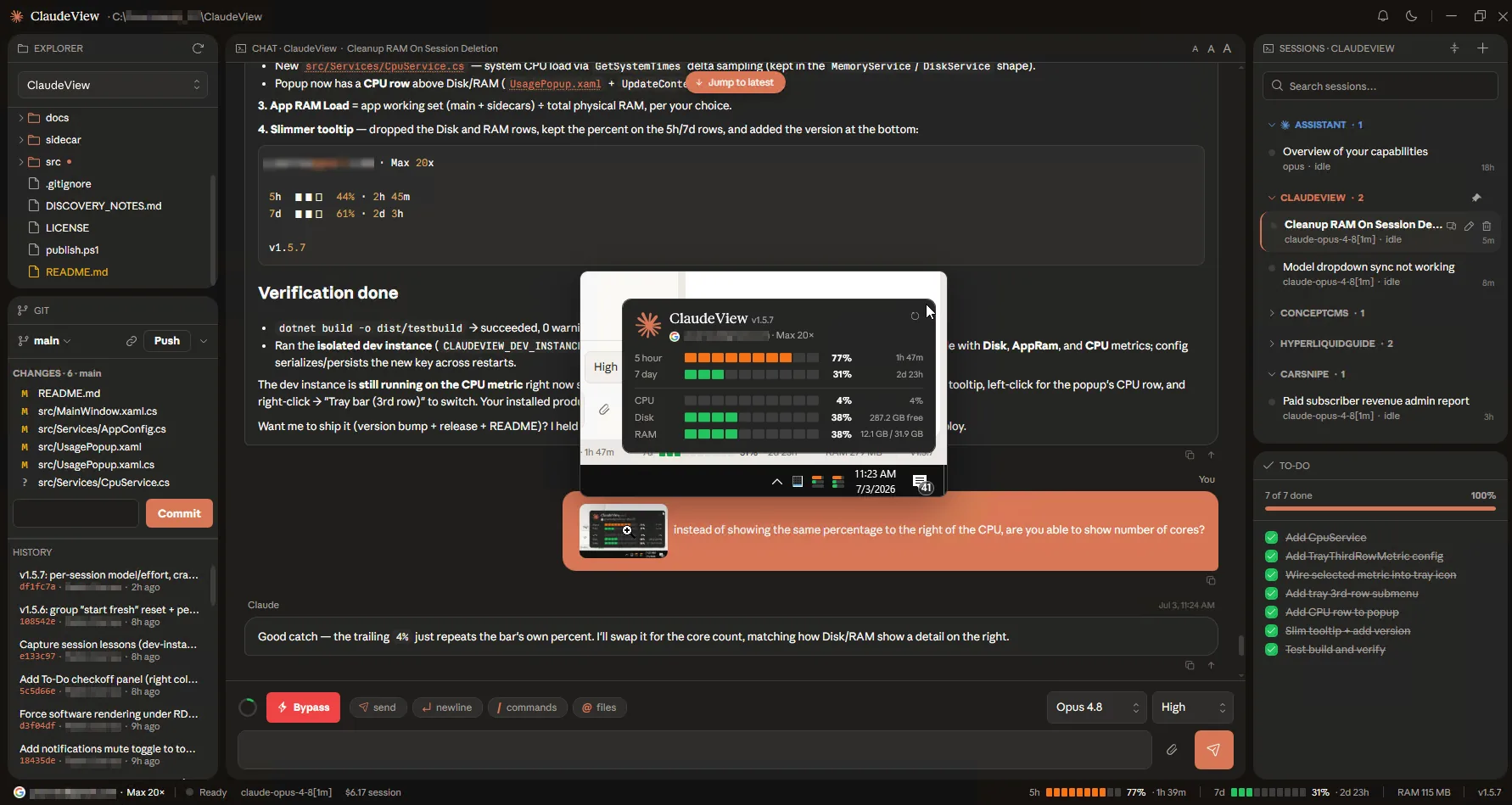
Claude Code is a command-line tool, and a terminal is a fine place to talk to it. It is a bad place to read a diff, scan a file tree, or notice that you are about to run out of context. ClaudeView is the window we wanted for that, and the interesting part of building it was refusing the easy answer.
What problem does ClaudeView solve?
You can drive Claude Code from a terminal all day. What you cannot do from a terminal is glance at which files changed, click a path the model just mentioned, watch a plan get approved, and keep half an eye on token usage, all without losing your place in the conversation. The information exists. It is just spread across a scrollback buffer, another terminal running git status, and an editor in a third window.
The obvious fix is the VS Code extension, and it is good. It also drags an entire editor along with it for a job that is mostly reading. We wanted the opposite shape: one small window that shows the conversation, the files, and the git state at the same time, and then gets out of the way.
Why not Electron?
Because the arithmetic does not work. An Electron app ships its own copy of Chromium, so a window that displays text starts at a few hundred megabytes resident and a cold start you can count out loud. Then it ships that browser again on every update. For a tool you leave open beside your actual work all day, that cost is paid continuously and buys nothing a user can see.
ClaudeView is C# on .NET 8 with WPF for the interface. It idles at roughly 120 MB against the 400 MB and up that a full editor wants for the same job. WebView2 is in there, but only for the panes that genuinely earn a browser: the Markdown document view, the code viewer, and the built-in mockup preview. That is the whole architectural argument, and it is the same one we make to clients on native Windows builds: use a web surface where it pays, and nowhere else.
What is actually in the window?
Three panes. A git-aware file tree that colors by status, so the files Claude touched are obvious without running anything. The chat in the middle, rendering streamed Markdown with tables as real bordered grids rather than pipe characters. A right-hand rail with the session list and a to-do checklist that mirrors Claude's own task list as it works.
The details that took the longest are the ones nobody notices. Every file path the model mentions is clickable, and so is every URL it prints, including the dot-less http://localhost:3000 style that Markdown's own autolinker skips. Markdown files open rendered as documents rather than raw text. Mockups open automatically in a built-in preview with a side-by-side button that tiles the app and the result across the monitor, and the chat re-pins to the latest message as the windows resize. Screenshots and PDFs open in that same preview instead of launching whatever the OS thinks should handle them.
The usage meter, and why it is in the tray
Token usage is the thing you want to know without asking. ClaudeView shows live usage bars and a click-to-open context and plan-usage panel, and the tray icon doubles as a glanceable meter, so the answer is available from any window on any monitor. There is also an opt-in Eco mode for when you would rather trade some capability for a smaller bill.
The same instinct produced Remote Control: a long agent run is exactly the kind of thing you want to check on from your phone while you are somewhere else. Alert sounds distinguish "task done" from "needs you", which sounds trivial until you have walked away from a run and come back to find it waiting on a yes.
What did the build cost, and what does it prove?
ClaudeView is free, runs on Windows 10 and 11, and installs and updates itself, so nobody is stranded on an old build. It is on GitHub if you want to read it rather than take our word for anything here.
What it proves is narrow and worth stating plainly: that a focused native app is still a reasonable thing to build in 2026, and that the memory and cold-start difference against a bundled-browser equivalent is large enough for a user to feel. It does not prove native is right for every desktop project. If you need one codebase across Windows, macOS, and Linux next quarter, this is the wrong trade and we would tell you so.
What this means for a build of your own
ClaudeView is the reference build behind our Windows desktop work: C#, .NET 8, WPF, WebView2 where it earns its place, a signed installer, and silent self-updates. The patterns in it are ones we run on our own release channel, which is the only reason we recommend them. If you have an aging Windows application that still works but is painful to maintain, or a new native tool you would rather not ship as a browser in a trench coat, that is the same conversation. For a look at how we treat a real-time system rather than a desktop one, read the CarSnipe alert engine.
Where these facts come from
Everything here describes ClaudeView as we build and ship it. The stack, the three panes and the features come from the app's own source and release history, both public on GitHub. The memory figure is the app's approximate resident size at idle, not a controlled benchmark, and the full-editor comparison is a ballpark for the same job rather than a measurement of one product.
You may republish these figures with attribution and a link to https://concept211.com/articles/claudeview-native-windows-app-case-study/. Every section heading carries a stable id, so you can link to one section instead of the whole page.
Quoting this? Cite this page
Concept211. “Case study: building ClaudeView, a native Windows app for Claude Code.” Published 28 July 2026, updated 20 October 2026. https://concept211.com/articles/claudeview-native-windows-app-case-study/
Have a Windows app to modernize?
Or a native tool to build without the browser-in-a-window baggage. Either one is the work we take on, and you own the source at handoff.